


Which is the better choice? Wix vs WordPress
Last updated: May 23, 2026 Read in fullscreen view


 Recommended for you
- 05 Oct 2025
 The New Facebook Algorithm: A Paradigm Shift in Content Discovery 294/356
 - 21 Dec 2023 Top 12 Low-Code Platforms To Use in 2024 221/1520
- 31 Dec 2025 10 Skills to Make You "Irreplaceable" in the Next 3 Years (even if AI changes everything) 169/203
- 18 Oct 2020 How to use the "Knowns" and "Unknowns" technique to manage assumptions 168/1263
- 25 Mar 2026 Token Bills: The "Cost Shock" After the AI Boom in Companies 167/190
- 03 Oct 2025 Top CMS Trends 2026: The Future of Digital Content Management 166/199
- 21 Nov 2025 Top 8 Cloud Transformation Companies in USA in 2026 164/220
- 20 Dec 2025 The Future of IT Consulting: Key Trends for 2026–2030 163/206
- 30 Oct 2022 How Much Does MVP Development Cost in 2023? 157/418
- 09 Jan 2022 How to Bridge the Gap Between Business and IT? 154/357
- 26 Mar 2026 What Is a System Integrator (SI)? Why the Software Subscription Model Is Becoming the New Standard 151/185
- 18 Jul 2024 The 8 Best ways to Innovate your SAAS Business Model in 2024 137/392
- 04 Feb 2026 Top Workflow Automation Services Driving Digital Transformation 135/170
- 01 Sep 2022 Facts Chart: Why Do Software Projects Fail? 134/729
- 23 Sep 2021 INFOGRAPHIC: Top 9 Software Outsourcing Mistakes 129/552
- 18 Aug 2022 What are the consequences of poor requirements with software development projects? 126/394
- 10 Apr 2021 RFP vs POC: Why the proof of concept is replacing the request for proposal 124/452
- 13 Dec 2020 Move fast, fail fast, fail-safe 120/461
- 11 Jan 2024 What are the Benefits and Limitations of Augmented Intelligence? 120/606
- 01 Oct 2020 Fail fast, learn faster with Agile methodology 119/1193
- 04 Mar 2026 CRM Trends Shaping Customer Engagement in 2026 117/148
- 06 Feb 2021 Why fail fast and learn fast? 116/594
- 20 Feb 2025 How Machine Learning is Shaping the Future of Digital Advertising 116/238
- 21 Aug 2023 30 Must-Know IT Consulting Buzzwords Explained 115/146
- 28 Nov 2025 Best Kentico CMS Development Practices for Agile Software Teams 113/168
- 16 Aug 2022 What is a Headless CMS? 113/399
- 06 Jan 2026 Risk & Change Management Through the 3P Model 113/158
- 27 Jul 2024 Positive Psychology in the Digital Age: Future Directions and Technologies 110/539
- 02 Dec 2024 The Intersection of AI and Business Analytics: Key Concepts to Master in Your Business Analytics Course 105/400
- 07 Jul 2021 The 5 Levels of IT Help Desk Support 103/582
- 03 Jan 2024 Why Partnership is important for Growth? 102/260
- 14 Mar 2024 Why should you opt for software localization from a professional agency? 102/241
- 03 Dec 2025 IT Outsourcing Solutions Explained: What, How, Why, When 101/133
- 15 Dec 2025 What Does ERP-Friendly Mean? A Practical Guide for Modern Enterprises 99/143
- 14 Oct 2021 Advantages and Disadvantages of Time and Material Contract (T&M) 99/997
- 16 Sep 2022 Examples Of Augmented Intelligence In Today’s Workplaces Shaping the Business as Usual 99/536
- 08 Nov 2022 4 tips for meeting tough deadlines when outsourcing projects to software vendor 99/391
- 16 Feb 2021 Choose Outsourcing for Your Non Disclosure Agreement (NDA) 99/269
- 11 Oct 2022 Why choose Billable Viable Product (BVP) over Minimum Viable Product (MVP) 98/440
- 28 Dec 2021 8 types of pricing models in software development outsourcing 96/530
- 18 Jan 2024 Self-healing code is the future of software development 96/313
- 20 Aug 2025 What Is Agentic AI? The Next Phase of Artificial Intelligence 95/255
- 25 Sep 2024 Enhancing Decision-Making Skills with an MBA: Data-Driven Approaches for Business Growth 95/302
- 23 Jun 2025 AI Avatars in the Metaverse: How Digital Beings Are Redefining Identity and Social Interaction 94/281
- 07 Aug 2022 Things to Consider When Choosing a Technology Partner 94/377
- 25 Jan 2025 The Decline of Traditional SaaS and the Rise of AI-first Applications 93/198
- 17 Feb 2022 Prioritizing Software Requirements with Kano Analysis 90/394
- 19 Oct 2021 Is gold plating good or bad in project management? 88/919
- 30 Jul 2024 The Future of IT Consulting: Trends and Opportunities 88/300
- 01 Mar 2024 (AI) Artificial Intelligence Terms Every Beginner Should Know 87/421
- 08 Oct 2022 KPI - The New Leadership 87/696
- 31 Dec 2023 Software Development Outsourcing Trends to Watch Out for in 2024 86/316
- 22 May 2025 Role of Self-Service in CRM: Customer & Partner Portals for Automation 85/169
- 09 Feb 2023 The Challenge of Fixed-Bid Software Projects 85/334
- 10 Nov 2022 Poor Code Indicators and How to Improve Your Code? 84/301
- 10 Jul 2025 Building AI-Driven Knowledge Graphs from Unstructured Data 84/246
- 10 Dec 2023 Pain points of User Acceptance Testing (UAT) 83/544
- 22 Nov 2024 The Role of AI in Enhancing Business Efficiency and Decision-Making 81/276
- 18 Aug 2024 The Future of Web Development: Emerging Trends and Technologies Every Developer Should Know 79/274
- 03 Nov 2023 Why Is Billable Viable Product An Alternative To Minimum Viable Product? 79/270
- 12 Mar 2024 How do you create FOMO in software prospects? 78/252
- 10 Sep 2024 Leading Remote Teams in Hybrid Work Environments 76/220
- 31 Dec 2022 The New Normal for Software Development 76/429
- 01 Mar 2023 Bug Prioritization - What are the 5 levels of priority? 75/304
- 19 Dec 2023 How AI is Transforming Software Development? 74/367
- 27 Feb 2025 How AI Agents are Changing Software Development? 74/312
- 03 Nov 2022 Top questions and answers you must know before ask for software outsourcing 73/358
- 19 Apr 2021 7 Most Common Time-Wasters For Software Development 72/617
- 31 Oct 2021 Tips to Fail Fast With Outsourcing 70/461
- 16 Apr 2021 Insightful Business Technology Consulting at TIGO 70/525
- 06 Mar 2021 4 things you need to do before getting an accurate quote for your software development 69/766
- 20 Nov 2022 Software Requirements Are A Communication Problem 69/312
- 09 Oct 2024 Short-Form Video Advertising: The Secret to Captivating Your Audience 69/201
- 07 Oct 2022 Digital Transformation: Become a Technology Powerhouse 65/312
- 05 Jan 2024 Easy ASANA tips & tricks for you and your team 63/262
- 01 May 2023 CTO Interview Questions 60/395
- 10 Sep 2024 AI in Email Marketing: Personalization and Automation 58/235
- 08 Jan 2024 Ask Experts: Explicitation/Implicitation and Elicitation; two commonly used but barely unraveled concepts 58/439
- 26 Dec 2023 Improving Meeting Effectiveness Through the Six Thinking Hats 54/330
- 09 Mar 2022 Consultant Implementation Pricing 50/263
- 01 Mar 2023 How do you deal with disputes and conflicts that may arise during a software consulting project? 50/211
- 06 Nov 2019 How to Access Software Project Size? 49/307
- 31 Dec 2022 Future of Software Development Trends and Predictions 48/199
- 17 Mar 2025 IT Consultants in Digital Transformation 42/133
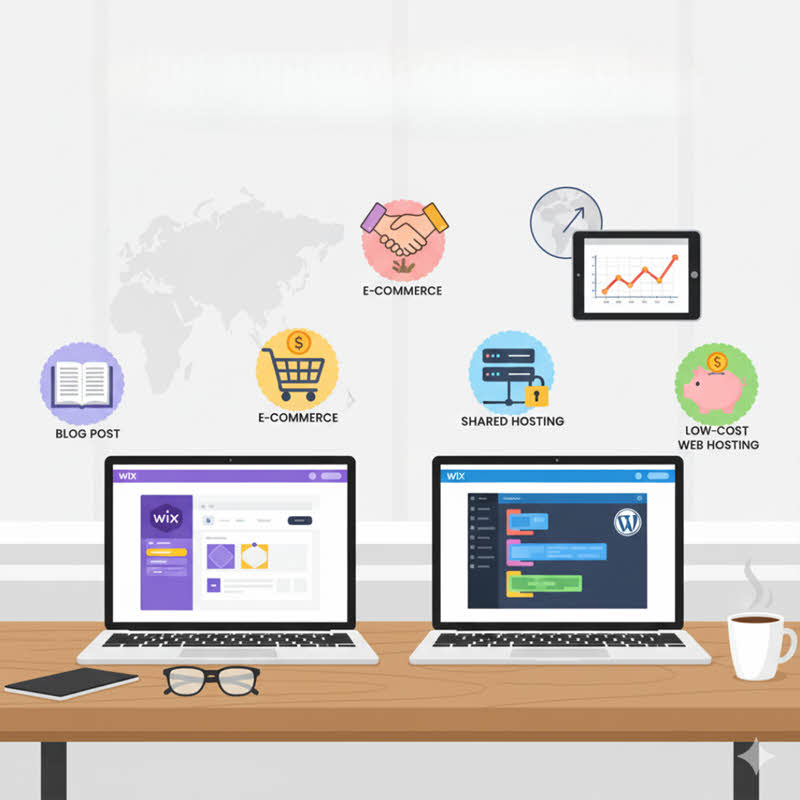
An online presence for a business or individual is mandatory in a connected world, but which platform is best for building a a website: Wix or WordPress? If you are just starting and thinking—how do I create a website? Where can I host it? Perhaps you’ve heard of Wix and WordPress already. Which is easier to use? Which works better on the internet? And most importantly: which is best for you? Read this article to find the answers.
What is Wix? What is WordPress?
What is Wix?
Wix is a website builder platform developed by the company Wix.com Ltd. It provides tools so that users can design and build personal or business websites easily and quickly, without needing programming knowledge. Wix offers a variety of templates for users to choose and customize, along with features like drag-and-drop editor, image/video editing, and other features to help users build their sites. It also includes content management, analytics, marketing, and e-commerce features.
What is WordPress?
WordPress is a widely used open-source content management system (CMS) for creating and managing websites and blogs. It is developed by a community of developers worldwide and is released under the GPL license for free.
WordPress is built on PHP and uses a MySQL database to store content. It provides an admin interface that lets users create, edit, and publish posts, pages, and other content types on their website.
With thousands of free and premium themes and plugins available, WordPress lets users customize and extend the functionality of their website flexibly. WordPress is also the most common platform in the world for building business websites, e-commerce stores, and news / content sites.
Detailed Comparison: Wix vs WordPress
The first key difference to understand is that Wix is a website builder, whereas WordPress is a content management system (CMS).
-
Wix is primarily used to help people build a website and host it online quickly and easily.
-
WordPress is a more flexible backend system able to manage multiple content types, including newsletters, subscriptions, video embeds, etc.
-
Another nuance: WordPress has two flavors:
- “WordPress.com” – a hosted service, where you register an account and build/host your site there (less control).
- “WordPress.org” – self-hosted: you host the website yourself (you choose hosting), giving you full control over the software, themes, plugins, etc.
There are many other important differences between the two systems. Below we compare them on multiple axes.
Ease of use: When comparing Wix vs WordPress, one big selling point is ease of use. Anyone can jump into Wix and build a website—but is WordPress user-friendly? However, ease of use may come at the expense of flexibility. Let’s examine:
-
User experience / Features
Wix is a WYSIWYG system (“What You See Is What You Get”). It offers a large, simple graphical interface so you can manipulate elements on the page directly to build your website.Its editor is less powerful than WordPress in terms of extensibility, but that is not necessarily bad—especially for beginners. There are enough features in Wix to create a solid website.
The templates help you see what your site might look like, and inspire you to build something functional and user-friendly.WordPress may feel slightly intimidating when you first encounter it. There is logic to learn and a steeper learning curve. But once you master it, building a site with WordPress becomes easier. That initial hurdle is what gives Wix an edge in terms of “ease” for new users.
Winner (ease of use): Wix
-
Drag-and-drop builders
Both platforms provide drag-and-drop style capabilities.Again, Wix has the advantage in simplicity here.
Winner: Wix
- In Wix, the DnD system is built in; it is core to how Wix works. You can drag images, text boxes, components onto the page.
- WordPress uses the Gutenberg block editor: you insert blocks (text block, image block, video block, etc.). You build the page block by block. It is less immediately visual than Wix’s DnD, but gives more flexibility. You often have to preview changes rather than seeing them live.
-
Themes / Templates
Themes define the visual aesthetics of your site: layout, color, structure, etc.Wix offers many themes (over 900) you can pick and customize (colors, images etc.). However, once you choose and launch, you cannot change the theme later; if rebranding or a big redesign is needed, you’d effectively have to rebuild the site.
WordPress, on the other hand, has tens of thousands (50,000+ free themes, plus premium ones) and allows you to switch themes freely. If the site is well structured, switching themes can preserve most elements. If something breaks, you may need some developer help to adjust. But the flexibility is vast.
Winner: WordPress
-
Plugins / Add-ons / Extensions
Plugins (or apps) add features you may not have by default—e.g. social media feeds, event calendars, contact forms, SEO tools, and more.Wix has an Apps Marketplace with a few hundred apps, in categories like Marketing, E-commerce, Events. If you’re using a free Wix version, e-commerce capabilities are limited. The apps are plug-and-play and integrate smoothly within Wix’s ecosystem.
WordPress has thousands upon thousands of plugins. Whatever feature you imagine for your site, there’s very likely a plugin for it. The open architecture allows you to fine-tune and extend your site deeply. For instance, SEO power can be greatly enhanced with plugins like Yoast.
Winner: WordPress
-
Open / Closed architecture
WordPress is open-source. Anyone with programming knowledge can write a theme, plugin, or modify the system. If you want to build a custom theme or custom widget, you can.Wix is closed: you can only use the apps, themes, and features that Wix allows. You cannot build your own core modifications beyond what Wix provides.
Winner: Tie (since open vs closed has pros and cons) -
Blog / Content / Writing
A strong content strategy often uses a blog. Which platform is better for blogging?Winner: WordPress
- Wix’s blogging is integrated, but less feature-rich compared to WordPress. The interface is slightly distinct from the site builder interface, and drag-and-drop page building may complicate blog authoring. Still, it is adequate for basic blogs.
- WordPress started as a blogging platform, before evolving into a CMS. Its blog features are extremely mature. You get internal linking, SEO plugins, media handling, categories & tags, revisions, scheduling, etc. It’s more powerful for content-centric sites.
-
E-commerce
On Wix, you must pay to use e-commerce functions. Business plans start at around $18/month for basic e-commerce, up to $38/month for more advanced. Wix also takes a cut per transaction sometimes (depending on your plan) and supports integration with third-party payment providers.WordPress uses WooCommerce (a plugin) to power e-commerce. Because WordPress is open, you can customize WooCommerce heavily to match your store needs. Features include unlimited products, filtering, payment gateways, shipping options, inventory, SEO, reporting, etc.
Winner: WordPress (especially for serious stores)
-
Cost
An important note: when comparing Wix vs WordPress, the price of Wix often includes hosting in the plan, whereas for WordPress hosting is separate.
Winner: Tie (depends heavily on scale and hosting choice)
- Wix has free plans (with Wix-branded subdomain), but with limitations. To use your own domain and advanced features, plans typically start around $10/month upward. E-commerce plans cost more.
- WordPress software itself is free. But you need domain + hosting. Domain might cost ~$10–20/year, while hosting can range from cheap shared plans (say $2–10/month) to VPS, cloud, or dedicated hosting.
- A few hosting providers charge $29/month or more for premium managed WordPress hosting.
Which is the better choice for you?
Wix is an excellent start for beginners. It gives you sufficient variation, templates, and built-in functionality right now—ideal for small businesses. WordPress becomes a better choice when your business grows, or you want more control, custom work, or scalability. WordPress is more complex initially but more powerful and flexible in the long run.
So choose based on your comfort level, stage, and likely growth. The biggest thing is: get yourself online. Once you’re there, the sky is the limit.
Advice on Hosting / Cost Packages & Scaling Strategy
Key considerations when choosing a hosting / service plan
When advising a client or planning for a website/blog, some key factors to consider:
-
Expected traffic / pageviews / visitors per day
More traffic = more server resources needed (CPU, RAM, bandwidth, I/O). -
Type of content / dynamic nature
If many pages are static, demand is lower; if many PHP queries, database calls, dynamic pages, caching, etc., demand is higher. -
Scalability & flexibility
Ability to upgrade resources without downtime or heavy migration. -
Budget constraints
You want efficient use of cost, avoiding overprovisioning early. -
Ease of management / support
For small sites, you may want managed hosting or simple UI; for advanced sites, full root/VPS might help. -
Hosting location / latency
If your audience is local (Vietnam, Southeast Asia), hosting in Vietnam or Singapore can reduce latency. -
Pay-as-you-go / cloud / burst capacity
For variable traffic, a flexible plan is advantageous.
Rough estimates: traffic vs hosting type & cost
Below are rough guidelines based on typical hosting cost ranges and traffic. These are illustrative; actual costs depend on provider, plan, and optimization.
| Daily traffic / pageviews | Suitable hosting tier | Approx monthly cost (USD) | Comments / caveats |
|---|---|---|---|
| ~100 views/day | Shared hosting (entry) | $2 – $10 / month | Very light site, mostly content, low DB load. |
| ~300–500 views/day | Shared hosting (higher tier) or “managed WordPress” | $5 – $15 / month | Use caching, CDN to reduce load. |
| ~1,000 views/day | Shared might suffice but pushing limits; better upgrade to VPS / cloud | $10 – $30+ / month | Shared might struggle under spikes; VPS gives more stability. |
| Several thousands/day | VPS / cloud hosting | $20 – $100+ / month DreamHost+3SiteGround+3Liquid Web+3 | More control, dedicated resources. |
| Very high traffic / enterprise | Cloud / dedicated / multi-server systems | $100 – several hundreds / month | Use load balancing, auto scaling, etc. |
- In countries with good IT infrastructure and affordable pricing, such as Vietnam, the Philippines, Indonesia, and India, some shared hosting providers offer basic plans: bkns.vn ists “Starter Plan” with SSD 1.5 GB at ~$1.50/month, 123HOST lists “HostOne” with SSD 1.2 GB at ~$1.84/month, “HostTwo” ~$2.63/month, etc.
- VPS in Vietnam: UltaHost offers a VPS starting at $4.80/month for 1 vCPU, 1 GB RAM, 30 GB NVMe SSD.
- Dedicated servers (Vietnam / region) start from ~$61/month (OVH dedicated) for basic servers.
Thus, if your site is small (100 visitors/day), a cheap shared plan is sufficient. As you grow, switching to a VPS with ~$10–30/month may be warranted.
Shared vs VPS: when to choose which?
-
Shared hosting
- Many users share the same server, resources are shared (CPU, RAM, disk I/O).
- Lower cost, easy to use and set up.
- For small to medium traffic sites, shared is often enough (especially with caching, CDN).
- Downside: less control, noisy neighbors, limited performance under heavy load.
- Good for blogs, simple business sites, portfolios.
-
VPS (Virtual Private Server)
- You get dedicated (or guaranteed) resources (CPU, RAM), your own OS instance.
- More control, ability to install custom software, scale, root access.
- Better performance and isolation.
- More technical responsibility (security, updates) unless using managed VPS.
- Suitable when traffic grows, shared hosting becomes unstable, or you need custom setups.
In practice, once your traffic regularly exceeds perhaps 800–1,000 visits per day (or when shared hosting shows slowness or failure during bursts), moving to a VPS or scalable cloud plan is sensible. Anecdotal advice: “if you have ~700 visitors/day, upgrade to VPS or cloud hosting” appears in forums.
LiquidWeb notes VPS plans typically cost between $10 and $100/month depending on resources.
DreamHost’s guide also explains that shared vs VPS is about resource guarantees and flexibility.
Here is a recommended strategy or progression, especially for blogs / small businesses, from smallest to larger:
-
Stage: Very small / blog / testing
- Use shared hosting (cheap plan) or even free site builders / basic Wix plan
- If using WordPress, pick a host that offers one-click install, auto WordPress updates, caching, etc.
- Use caching plugins, CDN, and lightweight themes to reduce resource demand
- Example: 100 views/day → shared hosting $3–5/month is plenty
-
Stage: Growing site / moderate traffic / slight complexity
- Traffic ~300–1,000/day
- Upgrade to a higher-tier shared plan or “managed WordPress” hosting, or a small VPS
- Use staging environment, backups, caching, performance tuning
- Monitor resource usage (CPU, memory, I/O) and page load times
-
Stage: High-traffic / dynamic content / e-commerce
- Move to VPS or cloud hosting (scalable)
- Use auto-scaling, load balancing if needed
- Use managed services or DevOps support
- Deploy database on separate server or use managed DB service
- Cost might go to $20–100+/month depending on scale
-
Stage: Large scale / enterprise / high avail / global reach
- Use cloud providers (AWS, GCP, Azure) or dedicated servers, multi-region setup
- Use auto-scaling, CDNs, caching layers, microservices
- Infrastructure costs may run into several hundreds to thousands/month
Also consider a “pay as you go / scale as you grow” model: start small, monitor metrics, and scale resources upward as traffic increases. This avoids overpaying early while still being prepared for growth.
When migrating from shared to VPS or cloud, ensure minimal downtime and proper configuration (caching, security, backups, etc.).
Recommendation: Wix vs WordPress – which is best in various scenarios
Below is a summary of which choice tends to fit best depending on user needs and growth expectations.
| Recommended platform | Why / benefits | Notes | |
|---|---|---|---|
| You are a beginner, want to launch quickly, minimal technical work | Wix (basic plan) | Very easy, drag-and-drop, hosting included | Good for small portfolio, brochure site, personal blog |
| You want blogging / content as focus, expect gradual growth | WordPress (self-hosted) | More flexibility, plugin ecosystem, SEO control | Use starter shared hosting, upgrade later |
| You plan to run e-commerce / store | WordPress + WooCommerce | Full control, extensibility, many payment / shipping options | Requires more setup, maintenance |
| You expect moderate to high traffic or growth | WordPress on VPS / cloud | Scalability, performance control | Monitor and scale as needed |
| You prefer convenience / managed hosting, less hands-on | Managed WordPress hosting / Wix Premium | Some maintenance taken care of, support included | Costs more, but less overhead |
| You want full custom / enterprise level site | WordPress + custom architecture (cloud / microservices) | Maximum flexibility, custom performance | Need technical support / team |
Conclusion
Start simple (Wix or cheap WordPress), then migrate to more scalable infrastructure (VPS, cloud) as you grow. The overhead of migrating is worth the long-term flexibility.
 Explore more on these topics


























 Guest Blogging: The Definitive Guide

 Top Trending Topics
 Share This
 Link copied!
 Recently Updated News