


No Editing Needed: Make Professional Explainer Videos with AI Instantly
Last updated: October 22, 2025 Read in fullscreen view


 Recommended for you
- 06 Mar 2026
 Next-Generation AI Agents Explained: OpenClaw, NanoClaw, IronClaw and the Rise of Agent Architectures 361/401
 - 01 Jan 2026 Youtube 2026 updates: 8 new features every creator should know 345/460
- 12 Jan 2026 A-Roll, B-Roll, and Jump Cuts: Three Core Concepts Every Video Creator Must Understand 257/312
- 10 Sep 2024 Complete Green Screen Setup Guide for Webcam Creators 221/288
- 02 Oct 2025 The YouTube Algorithm Has Changed: Why Your Old Strategy No Longer Works in 2025 202/399
- 14 Jan 2026 Why YouTube Channels Like “Monkey Explained” Use a Monkey as a Recurring Character 197/230
- 29 Oct 2024 Top AI Tools and Frameworks You’ll Master in an Artificial Intelligence Course 189/594
- 02 Dec 2025 The Question That Shook Asia: What Happens When We Ask AI to Choose Between a Mother and a Wife? 176/216
- 05 Jun 2025 How AI-Driven Computer Vision Is Changing the Face of Retail Analytics 171/295
- 18 Oct 2020 How to use the "Knowns" and "Unknowns" technique to manage assumptions 168/1263
- 23 Dec 2024 Garbage In, Megabytes Out (GIMO): How to Rise Above AI Slop and Create Real Signal 166/220
- 09 Jul 2024 What Is Artificial Intelligence and How Is It Used Today? 165/423
- 16 Oct 2025 AI Inference Explained Simply: What Developers Really Need to Know 163/197
- 24 Mar 2026 AI for Financial Reconciliation: Automating Finance Operations in 2026 159/190
- 06 Dec 2025 Enterprise Operations 2.0: Why AI Agents Are Replacing Traditional Automation 153/197
- 25 Nov 2025 How AI Agents Are Redefining Enterprise Automation and Decision-Making 134/192
- 01 Jun 2024 Top AI Video Tools for 2026 — Updated with 2025’s Quick Edit & Text-to-Video Trends 132/534
- 23 Sep 2021 INFOGRAPHIC: Top 9 Software Outsourcing Mistakes 129/552
- 25 Dec 2025 What Is Algorithmic Fairness? Who Determines the Value of Content: Humans or Algorithms? 129/174
- 18 Aug 2022 What are the consequences of poor requirements with software development projects? 126/394
- 12 Mar 2026 Beyond the Box: The Strategic Evolution of Unboxing Content in 2026 121/142
- 11 Jan 2024 What are the Benefits and Limitations of Augmented Intelligence? 120/606
- 01 Oct 2020 Fail fast, learn faster with Agile methodology 120/1194
- 13 Dec 2020 Move fast, fail fast, fail-safe 120/461
- 15 Apr 2024 Weights & Biases: The AI Developer Platform 120/311
- 06 Feb 2021 Why fail fast and learn fast? 117/595
- 17 Oct 2025 MLOps vs AIOps: What’s the Difference and Why It Matters 114/226
- 01 Jul 2025 The Hidden Costs of Not Adopting AI Agents: Risk of Falling Behind 113/262
- 10 Nov 2025 Multi-Modal AI Agents: Merging Voice, Text, and Vision for Better CX 104/218
- 27 Aug 2025 How AI Consulting Is Driving Smarter Diagnostics and Hospital Operations 103/203
- 12 Jan 2026 Companies Developing Custom AI Models for Brand Creative: Market Landscape and Use Cases 103/135
- 21 Nov 2025 The Rise of AgentOps: How Enterprises Are Managing and Scaling AI Agents 102/159
- 14 Mar 2024 Why should you opt for software localization from a professional agency? 102/241
- 14 Oct 2021 Advantages and Disadvantages of Time and Material Contract (T&M) 99/997
- 21 Aug 2024 What is Singularity and Its Impact on Businesses? 98/560
- 15 May 2025 AI Consulting for Small Businesses: How to Leverage AI for Growth & Efficiency 98/291
- 24 Dec 2024 Artificial Intelligence and Cybersecurity: Building Trust in EFL Tutoring 98/268
- 07 Nov 2025 Online vs. Offline Machine Learning Courses in South Africa: Which One Should You Pick? 97/169
- 28 Dec 2021 8 types of pricing models in software development outsourcing 96/530
- 06 May 2025 How Machine Learning Is Transforming Data Analytics Workflows 94/291
- 17 Feb 2022 Prioritizing Software Requirements with Kano Analysis 90/394
- 06 Jan 2025 How FlexClip AI Makes Video Editing Easier 89/269
- 19 Oct 2021 Is gold plating good or bad in project management? 88/919
- 28 Nov 2025 How AI Will Transform Vendor Onboarding and Seller Management in 2026 88/218
- 24 Oct 2025 AI Agents in SaaS Platforms: Automating User Support and Onboarding 87/158
- 08 Oct 2022 KPI - The New Leadership 87/696
- 10 Nov 2022 Poor Code Indicators and How to Improve Your Code? 85/302
- 10 Dec 2023 Pain points of User Acceptance Testing (UAT) 83/544
- 22 Sep 2025 Why AI Is Critical for Accelerating Drug Discovery in Pharma 82/197
- 04 Oct 2023 The Future of Work: Harnessing AI Solutions for Business Growth 80/361
- 12 Mar 2024 How do you create FOMO in software prospects? 78/252
- 01 Mar 2023 Bug Prioritization - What are the 5 levels of priority? 75/304
- 19 Apr 2021 7 Most Common Time-Wasters For Software Development 72/617
- 21 Apr 2025 Agent AI in Multimodal Interaction: Transforming Human-Computer Engagement 71/266
- 31 Oct 2021 Tips to Fail Fast With Outsourcing 70/461
- 01 Jul 2025 Stop Wasting Content - Turn Long Videos into Viral Clips in Minutes 66/220
- 05 Aug 2024 Affordable Tech: How Chatbots Enhance Value in Healthcare Software 64/295
- 05 Jan 2024 Easy ASANA tips & tricks for you and your team 63/262
- 15 Aug 2025 Quantum Technology: Global Challenges and Opportunities for Innovators 63/197
- 09 Apr 2025 How to Elevate Your Social Game with AI Face Reshaping and Body Editing Tools 61/319
- 29 Aug 2025 How AI Is Transforming Modern Management Science 60/128
- 26 Dec 2023 Improving Meeting Effectiveness Through the Six Thinking Hats 54/330
- 06 Nov 2019 How to Access Software Project Size? 49/307
- 06 Nov 2025 Top AI Development Companies in the USA to Watch in 2026 19/260
Create Stunning Explainer Videos with AI in Minutes
Imagine creating a whiteboard-style animated video using nothing but a single line of text — no video editing, no animation experience, no headaches. Sounds unbelievable? Thanks to Gulpo AI, it’s now a reality.
This innovative tool can turn your ideas or documents into professional animated explainer videos automatically — all within minutes. Let’s explore how it works.
Step 1: Access Gulpo AI
Head to the official Gulpo AI website (link in the description if you’re watching the video). Gulpo AI is powered by Y Combinator-backed technology, using one of the most advanced AI models for generating professional-quality videos.
No technical skills required — everything is handled for you by the AI.
Step 2: Sign In and Set Up Your Project
After signing in with your Google account, you’ll arrive at the main dashboard. From here, you can:
- Describe your video topic in natural language.
- Upload your document (PDF, DOCX, or plain text).
- Let Gulpo AI analyze the content and turn it into a complete animated video automatically.
You can choose your video’s style, length, language, and voice-over accent, and even add your logo or watermark.
Step 3: Create a Video from a Prompt
For example, let’s write this simple prompt:
“Create an explainer video about the latest AI tools for study.”
Then choose:
- Voice: U.S. male accent
- Duration: 2 minutes
- Format: Horizontal
- Style: Engaging, colorful animation
Click Generate Script, and in seconds, Gulpo AI will write a complete video script. You can review and edit it before moving to the next step.
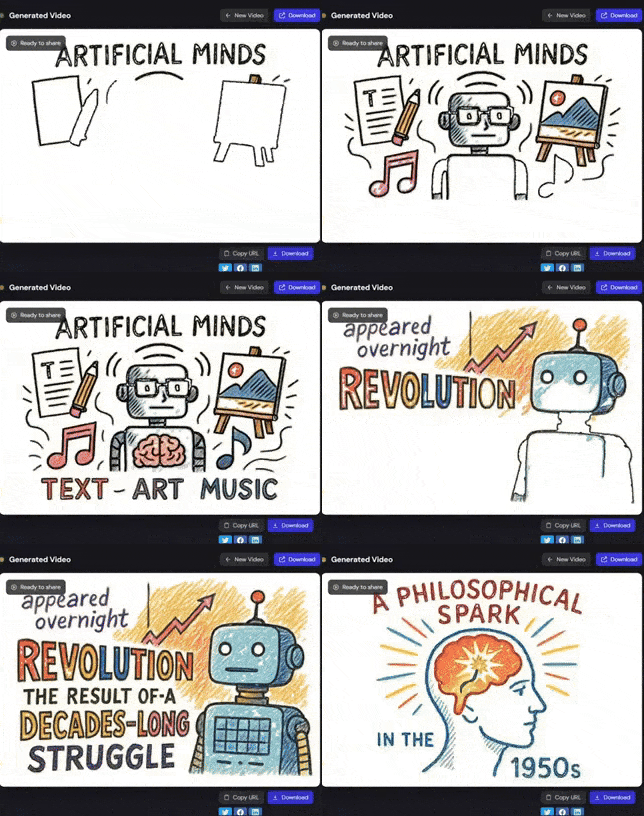
When ready, hit Generate Video — and within minutes, your explainer video will be rendered automatically.
Step 4: Create a Video from a Document
You can also start from a file instead of a prompt. For example, upload a PDF titled “Revolution of AI.”
Then simply type:
“Create a documentary-style video explaining the revolution of AI.”
Choose an enthusiastic voice tone, keep other settings similar, and click Generate Script. Once ready, you can preview, edit, and then create the final video.
The output looks incredibly realistic and cinematic, with smooth pacing, dynamic transitions, and professional-quality visuals — all generated automatically.
Step 5: Edit Your Video (Optional)
Need to make changes later?
Just go to Edit Mode, pick the video you want to modify, and select specific clips to update.
You can describe what you’d like to change — or even upload a reference image to guide the AI. Once you click Edit, Gulpo AI updates the video automatically. Preview your changes, and hit Finalize when satisfied.
Why It’s a Game-Changer
Traditionally, creating an animated explainer video involves:
- Writing the script
- Recording the voiceover
- Animating every scene manually
That process can take hours or even days. Gulpo AI compresses it into minutes — producing studio-quality animations for educators, marketers, and creators with zero editing experience.
Final Thoughts
With Gulpo AI, you can bring your ideas to life faster than ever. Whether you’re creating a whiteboard explainer, a documentary-style presentation, or a training video, it’s all just one prompt away.
If you found this guide useful, check out the full tutorial video on YouTube and explore how AI is redefining the future of content creation.
 Explore more on these topics


























 Guest Blogging: The Definitive Guide

 Top Trending Topics
 Share This
 Link copied!
 Recently Updated News