





Exploratory Testing: A Creative and Adaptive Approach to Software Quality
Last updated: October 28, 2025 Read in fullscreen view


 Recommended for you
- 18 Oct 2020
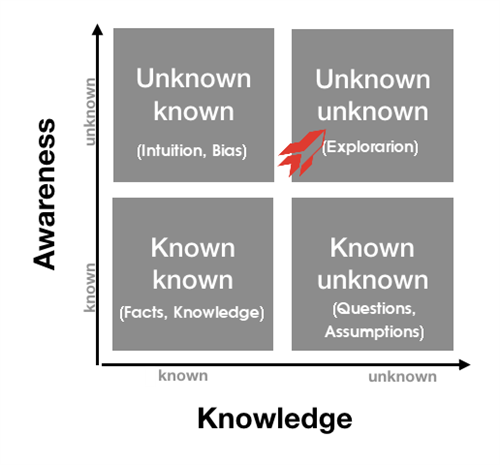
 How to use the "Knowns" and "Unknowns" technique to manage assumptions 165/1259
 - 19 Oct 2021 Software development life cycles 143/821
- 13 Oct 2021 Outsourcing Software Development: MVP, Proof of Concept (POC) and Prototyping. Which is better? 127/603
- 04 Oct 2021 Product Validation: The Key to Developing the Best Product Possible 127/435
- 23 Sep 2021 INFOGRAPHIC: Top 9 Software Outsourcing Mistakes 123/546
- 07 Oct 2025 Case Study: Using the “Messaging House” Framework to Build a Digital Transformation Roadmap 121/201
- 02 Jan 2024 What is User Provisioning & Deprovisioning? 120/712
- 11 Jan 2024 What are the Benefits and Limitations of Augmented Intelligence? 119/605
- 18 Aug 2022 What are the consequences of poor requirements with software development projects? 118/386
- 13 Dec 2020 Move fast, fail fast, fail-safe 118/457
- 06 Feb 2021 Why fail fast and learn fast? 114/590
- 03 Jan 2026 The Hidden Rules of IT Project Tendering: Laws, Principles, and Caveats You Must Know 114/136
- 01 Oct 2020 Fail fast, learn faster with Agile methodology 113/1187
- 12 Oct 2022 14 Common Reasons Software Projects Fail (And How To Avoid Them) 109/674
- 12 Aug 2024 Understanding Google Analytics in Mumbai: A Beginner's Guide 108/215
- 28 Jul 2022 POC, Prototypes, Pilots and MVP: What Are the Differences? 102/843
- 14 Mar 2024 Why should you opt for software localization from a professional agency? 102/241
- 31 Aug 2022 What are the best practices for software contract negotiations? 97/369
- 12 Dec 2021 Zero Sum Games Agile vs. Waterfall Project Management Methods 95/509
- 14 Oct 2021 Advantages and Disadvantages of Time and Material Contract (T&M) 95/988
- 05 Sep 2023 The Cold Start Problem: How to Start and Scale Network Effects 92/289
- 20 Oct 2025 How to Automate API Testing for Faster Release Cycles? 90/188
- 31 Oct 2025 Cloud-Based Testing for Retail: Faster, Smarter, Scalable 89/173
- 08 Oct 2022 KPI - The New Leadership 87/694
- 28 Dec 2021 8 types of pricing models in software development outsourcing 87/521
- 05 Mar 2021 How do you minimize risks when you outsource software development? 86/419
- 10 Nov 2022 Poor Code Indicators and How to Improve Your Code? 81/298
- 06 Mar 2024 [SemRush] What Are LSI Keywords & Why They Don‘t Matter 80/282
- 10 Dec 2023 Pain points of User Acceptance Testing (UAT) 79/537
- 19 Oct 2021 Is gold plating good or bad in project management? 79/910
- 01 Dec 2023 Laws of Project Management 78/393
- 13 Jan 2024 The “Rule of Law” in Software Projects: Engineering Principles That Govern Successful Development 78/100
- 17 Feb 2022 Prioritizing Software Requirements with Kano Analysis 75/379
- 18 Jul 2021 How To Ramp Up An Offshore Software Development Team Quickly 75/667
- 19 Apr 2021 7 Most Common Time-Wasters For Software Development 72/617
- 04 Oct 2022 Which ERP implementation strategy is right for your business? 70/430
- 12 Mar 2024 How do you create FOMO in software prospects? 70/243
- 01 May 2024 Warren Buffett’s Golden Rule for Digital Transformation: Avoiding Tech Overload 69/277
- 01 Mar 2023 Bug Prioritization - What are the 5 levels of priority? 69/298
- 31 Oct 2021 Tips to Fail Fast With Outsourcing 66/457
- 05 Jan 2024 Easy ASANA tips & tricks for you and your team 60/258
- 28 Oct 2022 Build Operate Transfer (B.O.T) Model in Software Outsourcing 57/467
- 26 Dec 2023 Improving Meeting Effectiveness Through the Six Thinking Hats 53/329
- 06 Nov 2019 How to Access Software Project Size? 42/299
Exploratory Testing helps quality assurance engineers and testers ensure that systems and applications work not only as users expect, but also under unusual or unexpected conditions.
This testing approach emphasizes exploration, investigation, and learning, giving testers the freedom and responsibility to think critically while testing.
1. What Is Exploratory Testing?
Exploratory Testing is a software testing method where testers freely explore the application to identify features, defects, or usability issues — without predefined test cases or scripts.
Instead of following a strict plan, testers interact with the application as real users would, discovering issues through creativity and intuition.
In traditional scripted testing, test cases are written in advance and executed step by step. In contrast, exploratory testing combines test design and execution simultaneously, allowing for faster discovery and real-time learning.
While scripted testing often becomes a repetitive and mechanical process (easily automated), exploratory testing remains a thinking activity — driven by insight, curiosity, and critical reasoning.
Key Characteristics of Exploratory Testing:
- Creativity – Encourages imagination and analytical thinking to identify hidden bugs and edge cases.
- No predefined plan – Testers rely on their domain knowledge, product experience, and instinct.
- Manual, not automated – Focuses on human observation and intuition that automation cannot replicate.
- Documentation – Testers record steps, findings, and outcomes to reproduce discovered issues.
Scripted vs. Exploratory Testing
| Scripted Testing | Exploratory Testing |
|---|---|
| Derived from requirements | Derived from both requirements and exploration |
| Test cases predefined | Test cases evolve during execution |
| Focus on confirmation | Focus on investigation and discovery |
| Emphasizes prediction and control | Emphasizes adaptability and learning |
| Verification-based | Inquiry-based |
| Controlled by scripts | Controlled by the tester’s mind |
Although automation is a rising trend in software testing, exploratory testing remains essential for uncovering insights that machines often overlook.
2. When Should You Use Exploratory Testing?
Exploratory Testing is particularly valuable when:
- The software is in early development stages with frequent code changes.
- Developers use it for unit testing, while testers learn the system through hands-on exploration.
- The results and insights are later used to design more structured test cases.
- In Agile or Scrum environments, where short sprints leave little time for formal documentation.
At the end of each sprint, testers can document findings from exploratory sessions for use in future cycles — saving time while improving test coverage.
3. How to Perform Exploratory Testing
Exploratory Testing follows a structured approach often called Session-Based Test Management (SBTM), which consists of five main stages:
a. Create a Defect Taxonomy
Analyze:
- Common defects found in previous projects.
- Root causes of recurring issues.
- High-risk areas that deserve extra attention.
b. Define a Test Charter
A Test Charter specifies what to test, how to test it, and what to look for.
It provides a starting point for exploration and simulates how end-users might interact with the system.
c. Set a Timebox
Typically, two testers work together for a 60–90-minute uninterrupted session.
This focused approach encourages deep engagement and adaptive feedback.
d. Evaluate Results
After each session:
- Review discovered defects.
- Assess test coverage.
- Identify lessons learned.
e. Debrief and Document
Summarize findings, compare outcomes with the original charter, and decide if further testing is needed.
Documentation should include:
- Scope of testing and coverage achieved.
- Risks identified and their priority.
- Execution logs of test actions.
- Open questions or issues for follow-up.
4. Exploratory Testing Techniques
Here are several proven techniques for effective exploratory testing:
- Error Guessing – Use past experience to predict where bugs are most likely to appear.
- Architecture & Use Case Diagrams – Identify component interactions and end-user flows for testing.
- Defect Analysis – Study past releases to understand high-defect areas.
- Error Handling Tests – Explore how the system behaves under failure conditions.
- Team Discussions – Use brainstorming and project meetings to generate new test ideas.
- Checklists & Questions – Ask “what, when, how, who, and why” to guide deeper exploration.
5. Advantages of Exploratory Testing
- Works well even when documentation is incomplete or unavailable.
- Finds more defects than traditional scripted testing.
- Uncovers subtle, overlooked bugs through investigation and intuition.
- Stimulates creativity and tester engagement.
- Provides wide coverage, including unusual and edge-case scenarios.
- Encourages innovative thinking and adaptability.
6. Limitations of Exploratory Testing
- Random, unplanned tests can be hard to review or reproduce.
- Results depend heavily on the tester’s skill, domain knowledge, and experience.
- Requires time to understand the application before testing effectively.
- Not ideal for long-running or complex time-dependent systems.
7. Best Practices for Effective Exploratory Testing
- Stay goal-focused: Act like a real user while intentionally seeking out weaknesses and edge cases.
- Plan without scripting: You can plan objectives but avoid rigid test scripts.
- Don’t over-test: The goal is not full coverage, but discovering defects other tests miss.
- Use experienced testers: Exploratory testing is a skillful, professional activity.
- Keep detailed notes: Document what was tested, how, and what was found.
- Combine with automation: Use exploratory testing to discover bugs, then automate to prevent regressions.
- Apply it to performance testing: Monitor system load or latency behavior through exploratory methods.
- Select techniques that fit your needs: Tailor your exploratory style and tools to project requirements.
- Don’t confuse it with User Acceptance Testing (UAT): Exploratory testing is a technique, not a project phase.
- Use tools wisely: Even simple tools like pen and paper can be effective — don’t delay testing just because you lack fancy software.
8. Final Thoughts
It empowers testers to think critically, act creatively, and discover insights beyond the limits of automation.
In the age of Agile and rapid development, this approach keeps the human element alive in software quality — where intuition, curiosity, and learning still matter most.
9. Frequently Asked Questions about Exploratory Testing
1. How is Exploratory Testing different from Manual Testing?
Both are manual testing methods, but the key difference is that Exploratory Testing does not have a fixed script. While Manual Testing follows pre-defined steps and expected results, Exploratory Testing allows the tester to simultaneously learn, test, and flexibly adjust the testing strategy based on what they discover during the testing process.
2. When should Exploratory Testing be used?
This method is particularly effective when:
- The project is new and lacks complete documentation or test cases.
- The system is changing rapidly, for example, during the prototyping phase or short sprints.
- There is a need to evaluate the user experience (UX) and find real-world bugs.
- You want to quickly verify the stability of a new build.
3. Who should perform Exploratory Testing?
Usually, experienced QA testers take on this role. However, developers, business analysts, or product owners can also participate, as the main goal of this method is to gain a deeper understanding of the product and uncover issues from a genuine user perspective.
4. How do you record results during exploratory testing?
Although Exploratory Testing is flexible, the tester should carefully note the steps taken, such as:
- Specific actions (clicking a button, entering data, navigating pages, etc.)
- Expected results vs. actual results
- Bugs or unusual behavior discovered
- Tools like TestRail, Xray, or Miro Board can also support recording the testing session.
5. Can Exploratory Testing be combined with Automation Testing?
Yes. In fact, they are a perfect complementary pair.
- Automation Testing ensures fast and accurate regression checks.
- Exploratory Testing helps find new, unusual bugs or unexpected user experiences that automation cannot predict.
By combining both, the test team achieves both technical coverage and ensures the practical reality of the user experience.
6. Are there any tools to support Exploratory Testing?
Although the method is human-centric, there are tools that help record, capture screenshots, or video the testing process, such as:
- Session-based Test Management (SBTM)
- Test & Feedback (Azure DevOps extension)
- Rapid Reporter
- PractiTest
These tools help save evidence and report tests professionally, especially in an Agile environment.
7. How do you measure the effectiveness of Exploratory Testing?
You can evaluate based on metrics such as:
- The number of defects found (and their severity).
- The scope of functionality explored.
- The tester's level of understanding of the system after each test session.
Additionally, feedback from developers and end-users is also a key indicator of the quality of the exploratory testing process.
8. How is Exploratory Testing different from Ad-hoc Testing?
Although both do not follow fixed test cases, they differ in terms of organization and objective:
| Criterion | Exploratory Testing | Ad-hoc Testing |
| Objective | Deliberately explore the system to learn and evaluate product quality. | Impromptu testing, aiming to find bugs quickly in a short time. |
| Structure & Recording | Has an overall plan, often session-based (testing session is time-boxed and has a clear objective). | No specific plan, little or no recording of steps. |
| Performer | Usually an experienced tester who knows how to design and record observations. | Anyone (including developers or trial users) can perform it. |
| Output | Clear reports and logs that help reproduce bugs and improve the product. | Bugs can be found quickly but are difficult to reproduce and track. |
| Professionalism | A recognized testing method with specific techniques. | Spontaneous and informal, often used for a "quick check" before release. |
In summary:
- Exploratory Testing is "structured improvisation" – the tester simultaneously learns, explores, and analyzes.
- Ad-hoc Testing is "pure improvisation" – a quick check to see if there are any obvious bugs.
Both are useful in different project phases: Ad-hoc is suitable for fast bug finding, while Exploratory is suitable for deep understanding and comprehensive quality evaluation.
9. What is Session-Based Exploratory Testing?
Session-Based Exploratory Testing (SBTM) is a method of organizing Exploratory Testing into clearly structured work sessions. Instead of random testing, the tester performs "sessions" that are limited in time, objective, and scope, while recording the process to ensure measurability and reproducibility.
The key elements of SBTM include:
- Charter (Session Goal): Each session begins with a "charter" – describing the objective, scope, and issues to be tested (e.g., "Test the payment process when the user changes the language").
- Time-box (Time Limit): Each session usually lasts from 60 to 120 minutes, helping the tester maintain high focus and avoid getting sidetracked.
- Notes (Record & Log): The tester meticulously records actions, results, bugs, and observations during the testing process.
- Debrief (Post-Session Report): After each session, the tester and QA lead discuss the results, evaluate the value found, and decide on the next testing direction.
Benefits of the SBTM method:
- Helps better control the exploratory testing process while maintaining flexibility.
- Increases the repeatability and measurability of testing effectiveness.
- Supports transparent and professional reporting in Agile or DevOps environments.
- Creates a good foundation for coordination among testers in the team.
Example:
Suppose you are testing a banking application. A testing session might have:
- Charter: Test the money transfer process between two accounts at different banks.
- Time-box: 90 minutes.
- Result: 3 UI bugs, 1 system error that fails to process when the user enters special characters in the "Transfer content" field.
In conclusion: Session-Based Exploratory Testing is a way to make the "free exploration" process more organized, goal-oriented, and easier to report, while maximizing the tester's creativity and experience.
 Explore more on these topics
























 Guest Blogging: The Definitive Guide

 Top Trending Topics
 Share This
 Link copied!
 Recently Updated News