


What is a Cut-Over in Software Development?
Last updated: November 05, 2025 Read in fullscreen view


 Recommended for you
- 18 Oct 2020
 How to use the "Knowns" and "Unknowns" technique to manage assumptions 163/1257
 - 02 Nov 2023 Differences between software walkthrough, review, and inspection 157/2299
- 30 Oct 2022 How Much Does MVP Development Cost in 2023? 149/406
- 09 Jan 2022 How to Bridge the Gap Between Business and IT? 143/346
- 01 Sep 2022 Facts Chart: Why Do Software Projects Fail? 127/720
- 11 Jan 2024 What are the Benefits and Limitations of Augmented Intelligence? 119/605
- 13 Dec 2020 Move fast, fail fast, fail-safe 117/456
- 18 Aug 2022 What are the consequences of poor requirements with software development projects? 116/384
- 06 Feb 2021 Why fail fast and learn fast? 113/588
- 01 Oct 2020 Fail fast, learn faster with Agile methodology 112/1186
- 10 Apr 2021 RFP vs POC: Why the proof of concept is replacing the request for proposal 111/438
- 02 May 2022 What Is RAID in Project Management? (With Pros and Cons) 104/947
- 07 Jul 2021 The 5 Levels of IT Help Desk Support 102/578
- 14 Mar 2024 Why should you opt for software localization from a professional agency? 100/239
- 23 Sep 2021 INFOGRAPHIC: Top 9 Software Outsourcing Mistakes 98/521
- 08 Nov 2022 4 tips for meeting tough deadlines when outsourcing projects to software vendor 97/387
- 03 Dec 2025 IT Outsourcing Solutions Explained: What, How, Why, When 96/128
- 16 Feb 2021 Choose Outsourcing for Your Non Disclosure Agreement (NDA) 93/263
- 14 Oct 2021 Advantages and Disadvantages of Time and Material Contract (T&M) 92/985
- 21 Oct 2025 Cloud-Native Development: Why It’s the Future of Enterprise IT 91/180
- 08 Oct 2022 KPI - The New Leadership 85/692
- 28 Dec 2021 8 types of pricing models in software development outsourcing 85/519
- 07 Aug 2022 Things to Consider When Choosing a Technology Partner 84/367
- 09 Feb 2023 The Challenge of Fixed-Bid Software Projects 80/329
- 10 Nov 2022 Poor Code Indicators and How to Improve Your Code? 79/296
- 19 Oct 2021 Is gold plating good or bad in project management? 78/909
- 10 Dec 2023 Pain points of User Acceptance Testing (UAT) 77/535
- 17 Feb 2022 Prioritizing Software Requirements with Kano Analysis 75/379
- 10 Jan 2024 Like for Like – how to preserves existing business and leverage technological advancement 74/494
- 01 Feb 2024 How long does it take to develop software? 73/283
- 03 Nov 2022 Top questions and answers you must know before ask for software outsourcing 72/357
- 19 Apr 2021 7 Most Common Time-Wasters For Software Development 72/617
- 16 Apr 2021 Insightful Business Technology Consulting at TIGO 69/523
- 01 Mar 2023 Bug Prioritization - What are the 5 levels of priority? 68/297
- 10 Jul 2025 Building AI-Driven Knowledge Graphs from Unstructured Data 68/230
- 12 Mar 2024 How do you create FOMO in software prospects? 67/240
- 31 Oct 2021 Tips to Fail Fast With Outsourcing 65/456
- 20 Nov 2022 Software Requirements Are A Communication Problem 61/303
- 05 Jan 2024 Easy ASANA tips & tricks for you and your team 60/258
- 06 Mar 2021 4 things you need to do before getting an accurate quote for your software development 60/757
- 15 Aug 2025 Quantum Technology: Global Challenges and Opportunities for Innovators 60/190
- 01 May 2023 CTO Interview Questions 59/394
- 07 Oct 2022 Digital Transformation: Become a Technology Powerhouse 59/306
- 26 Dec 2023 Improving Meeting Effectiveness Through the Six Thinking Hats 53/329
- 09 Mar 2022 Consultant Implementation Pricing 49/261
- 01 Mar 2023 How do you deal with disputes and conflicts that may arise during a software consulting project? 47/207
- 17 Mar 2025 IT Consultants in Digital Transformation 41/131
- 06 Nov 2019 How to Access Software Project Size? 39/296
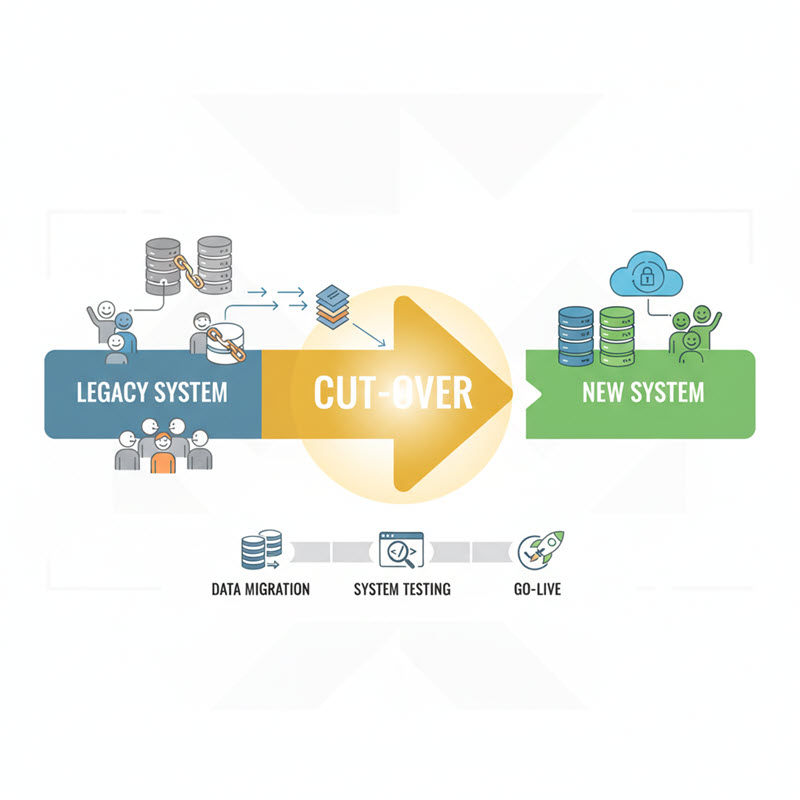
In any software implementation or system upgrade, the transition from an old legacy system to a new environment is one of the most critical phases. Known as a Cut-Over, this period involves data migration, testing, and final go-live activities, requiring careful planning and coordination to minimize risks and ensure business continuity. Understanding the advantages, potential drawbacks, and best-fit scenarios of Cut-Over is essential for project managers, IT teams, and stakeholders to execute a smooth, high-impact system transition without disrupting ongoing operations.
What is Cut-Over?
Cutover is the time period between the end of the old system and the beginning of the new system. It typically includes data conversion, testing, and training. During this time, the new system is put into place and is ready for use.
Cutover refers to the critical period in a system implementation project when an organization transitions from its old system to a new one. It marks the point where the legacy system is decommissioned, and the new system becomes fully operational. This period usually encompasses several key activities, including data migration or conversion, system and integration testing, user training, and final system validation to ensure that the new environment functions as intended.
Cutover offers several clear benefits, but it also carries risks and is better suited for certain scenarios:
Advantages
- Immediate System Availability: Users can start leveraging new features and improved processes without delay.
- Clear Transition Point: Establishing a defined cutover date creates focus and accountability for project teams and stakeholders.
- Simplified Data Handling: Migrating all legacy data at once reduces the risk of inconsistencies that could arise if old and new systems run concurrently.
Drawbacks
- High Risk of Disruption: Any issues during cutover—such as incomplete data migration or technical bugs—can cause operational downtime.
- Resource Intensive: Requires concentrated effort, support staff, and contingency planning, potentially increasing project costs.
- Pressure on Users: Rapid adaptation is needed; insufficient training or communication may result in mistakes and temporary drops in productivity.
Best Fit Scenarios
- When the new system differs significantly from the old, making gradual migration impractical.
- When data consistency and integrity are critical, and running both systems in parallel could introduce errors.
- When the organization can commit sufficient resources for an intensive, high-stakes transition period with robust support and training.
➡️ Cutover is a high-impact approach that allows for a fast, decisive switch to a new system. Its success depends on meticulous planning, thorough testing, and well-prepared users to minimize risks and ensure a smooth transition.
What is a Cut-Over in Software Development?
Cutover brings a system, application or interface live into an environment which can include steps such as moving build or repointing interfaces from a non-production to production environment.
The cutover typically involves the following:
- Submission of change control requests for maintenance window approval
- Remediation: Removal of old multi-path software and installation of new multi-path software
- Installation of vendor-recommended host-based software and/or tools
- Re-cabling of servers (if migrating to new SAN)
- SAN zoning to new storage
- Post cutover verification of storage and application viability
- Re-establishment of replication
- Optional shredding of old data
What is a cut over in business?
What is an example of a cut over?
A change from old computer systems, equipment, etc. to new ones: The cutover left users with no interruption in services during the transition. a change from one part of a business plan to the next one: The company has been growing again thanks to a cutover of all production to its trademark green longneck bottles.
What are the three cutover strategies?
The three system cutover strategies are direct conversion, phase-in approach, pilot startup or parallel start up approach.
Is data migration part of cutover?
The cutover process is the final step in completing your data migration. It involves multiple steps and should be a highly orchestrated event. Allow adequate time for the cutover of each server and try to do things in a concurrent manner.
What is the difference between deployment and cutover?
A Deployment Plan is a broader term that encompasses all the activities required to deploy a system or application to its target environment. A Cutover Plan, on the other hand, is a specific part of the Deployment Plan that deals with the process of transitioning from the old system or application to the new one.
What is the difference between cutover and go live?
A cut over plan is a detailed set of activities to be performed for a successful go live including data migration, transition actions with specific start and end dates, and so on.
What is a cutover checklist?
A cutover plan is very simply the list of tasks that focuses on transitioning from the old system to the new system. This should include a series of steps that must be planned, executed, and monitored to ensure successful deployment.
What is a Cutover runbook?
Such a plan can be documented by using a cutover runbook. A cutover runbook covers all the activities that must be completed for a given migration. It is a comprehensive and detailed guide of the following: Activities. Planned timeline.
What is Cut-Over Testing?
Business Continuity is the focus area when businesses are planning to go for a transformation of their existing software applications. They need to plan for a smooth transitioning from their legacy systems to the new ones. During this transition, there should not be any break in their Business As Usual operations. It may require some of the Work In Progress (WIP) items to be carried forward and resumed from the same state in the new system. Specific workflows to be migrated in "As is" form wherever possible. Some complex workflows may require to be closed with all the WIP items before data migration.
While ensuring business continuity is the top priority, organizations also need to implement mechanisms to record and track each step of the cut-over process. Focusing solely on functionality without capturing evidence and the system’s pre-cutover state can create difficulties in handling incidents, assigning accountability, or evaluating the impact of any errors. Therefore, collecting evidence, maintaining detailed records, and ensuring transparency becomes an essential step to protect the organization and provide a basis for informed decisions later on.
Evidence and Documentation: A Must
To protect the organization and clarify responsibilities:
- Pre-cutover evidence collection: Record screenshots, capture key system states, and document workflows.
- Video documentation: Produce quality videos illustrating processes and system behavior before cutover.
- Comprehensive records: Maintain large document sets capturing system, data, and workflow states.
- This ensures that if issues arise post-cutover, there is clear, verifiable evidence to determine accountability and review decisions.
Example Scenarios in Banking
In a data migration, data fields from the databases in the legacy systems need to be mapped to the new databases in the target systems before the Extract, Transform and Load (ETL) phases. Usually there will be separate testing for data migration completeness & data integrity between source and target systems.
After successful completion of data migration testing & data integrity testing, a functional testing will be performed to validate that the system behaves in the expected manner. Usually functional testing with migrated data performed after the majority of system functions became stable after a few rounds of testing with simulated test data.
While we plan for a functional testing with migrated data, we tend to miss the intricacies related to Cut-Over, broadly indicating the continuity of business between the time periods for transition from one system to another. So adding a few test scenarios related to these WIP transactions is essential. This testing will help us to get ready for the big day of Go-Live and identify the gaps in preparation to Go-Live.
These scenarios may vary based on the scope of migration as well. For example in a Core Banking Transformation, it can be decided that only Customers and accounts will be moved with related transactions for a limited period. Or only specific customers & accounts related to specific products are moved to the new system if the bank decides to go live in a phased manner. In most of the cases, legacy systems and new systems will run in parallel for a certain period, to eliminate all the initial issues. So the scope of data migration will be the basis for the specific test scenarios.
Again to explain this concept with some precise example, we will look in to the following scenarios in a Core Banking Transformation
- What will happen to Debit Card / Credit Card POS (Point of Sale) transactions done during the migration period?
- If the migration is happening between the months, how the monthly account statements will be generated using the transaction details from old system & new system?
- If the ATM transactions are allowed during the migration period, how will they be processed in the new system?
- Cheque clearance for those lodged for collection in the legacy system
- Continuing the life cycles of things like cheque book requests, credit card / loan /account opening applications which are in various stages of the workflow.
- How to handle Teller Till balances on the day before the migration?
- Interest accrual & payment based on the daily balance or average balance at end of month or quarter based on the details from both the systems.
- GL balancing after freezing transactions at the legacy system and GL balancing in the new system before the start of business in the new system.
- Stop Payment of cheques set up in the legacy system to be validated in the new system. Standing Instructions set up in the legacy system to be validated in the new system. Particularly for those set up for the first day.
- Documents / Files / Signatures related to Customers / Loans are to be validated in the new system.
- Validating the routines and calculations involved in Beginning of Day (BOD) and End of Day (EOD) batch jobs between the legacy & new systems. Any mismatch or omissions in these might cause financial impact.
- Various transactions done through different channels / surround systems during the migration cut off to be validated in the new system.
Many of these scenarios may or may not be covered in your regular test pack. When we closely look at the data migration strategy, we will come up with many questions on how to handle these business continuity without a bumpy ride. The missing scenarios to be added to the test pack before testing with migrated data.
A detailed understanding on system framework, General Ledger structure, Batch Job routines in both Legacy & new systems is key to handle this Cut-off period effectively. Multiple sessions of brainstorming between various stakeholders including business, technology, development & testing teams is required to come up with the preparatory work to handle this big day of transformation. All the examples given above are from Banking, but readers can get a fair amount of insights related to their domains by comparing these examples. Nomenclature for this activity may be different at different domains and geographies.
It would be great to see any feedback, comments & first-hand experience related to Cut-Off testing from readers of this post.
 Explore more on these topics

26072024043639_thumb.jpg)
























 Guest Blogging: The Definitive Guide

 Top Trending Topics
 Share This
 Link copied!
 Recently Updated News