


Creately: A Versatile Tool for Visual Thinkers
Last updated: October 18, 2025 Read in fullscreen view


 Recommended for you
- 21 Sep 2023
 Abraham Wald and the Missing Bullet Holes 191/896
 - 18 Oct 2020 How to use the "Knowns" and "Unknowns" technique to manage assumptions 168/1263
- 28 Oct 2025 The Future of Real Estate: Key Trends and Essential Lessons in Digital Transformation 150/222
- 12 May 2026 Top 6 AI AR/VR Filter Tools for Mind-Blowing Videos and Photos in 2026 147/168
- 19 Oct 2021 Software development life cycles 145/823
- 04 Oct 2021 Product Validation: The Key to Developing the Best Product Possible 134/442
- 13 Oct 2021 Outsourcing Software Development: MVP, Proof of Concept (POC) and Prototyping. Which is better? 130/608
- 23 Sep 2021 INFOGRAPHIC: Top 9 Software Outsourcing Mistakes 129/552
- 07 Oct 2025 Case Study: Using the “Messaging House” Framework to Build a Digital Transformation Roadmap 127/207
- 18 Aug 2022 What are the consequences of poor requirements with software development projects? 126/394
- 11 Jan 2024 What are the Benefits and Limitations of Augmented Intelligence? 120/606
- 13 Dec 2020 Move fast, fail fast, fail-safe 120/461
- 01 Oct 2020 Fail fast, learn faster with Agile methodology 119/1193
- 28 Jul 2022 POC, Prototypes, Pilots and MVP: What Are the Differences? 116/858
- 06 Feb 2021 Why fail fast and learn fast? 116/594
- 12 Oct 2022 14 Common Reasons Software Projects Fail (And How To Avoid Them) 116/681
- 29 Nov 2021 Memorandum of Understanding (MOU) for Partnership Agreements 114/685
- 28 Nov 2025 Best Kentico CMS Development Practices for Agile Software Teams 113/168
- 12 Aug 2024 Understanding Google Analytics in Mumbai: A Beginner's Guide 112/219
- 10 Aug 2024 Odoo vs. Lark: A Comprehensive Comparison 109/939
- 20 Dec 2021 What is Hybrid Mobile App Development? 102/504
- 14 Mar 2024 Why should you opt for software localization from a professional agency? 102/241
- 07 Nov 2022 Why Design Thinking can save the outsourcing industry 101/293
- 14 Oct 2021 Advantages and Disadvantages of Time and Material Contract (T&M) 99/997
- 12 Dec 2021 Zero Sum Games Agile vs. Waterfall Project Management Methods 98/512
- 31 Aug 2022 What are the best practices for software contract negotiations? 97/371
- 28 Dec 2021 8 types of pricing models in software development outsourcing 96/530
- 09 Sep 2024 How AI Rewriting Can Improve Your Content’s SEO Performance 96/294
- 05 Sep 2023 The Cold Start Problem: How to Start and Scale Network Effects 95/293
- 05 Mar 2021 How do you minimize risks when you outsource software development? 93/426
- 17 Feb 2022 Prioritizing Software Requirements with Kano Analysis 90/394
- 19 Oct 2021 Is gold plating good or bad in project management? 88/919
- 08 Oct 2022 KPI - The New Leadership 87/696
- 10 Nov 2022 Poor Code Indicators and How to Improve Your Code? 85/302
- 06 Mar 2024 [SemRush] What Are LSI Keywords & Why They Don‘t Matter 85/287
- 10 Dec 2023 Pain points of User Acceptance Testing (UAT) 83/544
- 01 Dec 2023 Laws of Project Management 81/396
- 12 Mar 2024 How do you create FOMO in software prospects? 78/252
- 18 Jul 2021 How To Ramp Up An Offshore Software Development Team Quickly 76/668
- 01 Mar 2023 Bug Prioritization - What are the 5 levels of priority? 75/304
- 19 Apr 2021 7 Most Common Time-Wasters For Software Development 72/617
- 04 Oct 2022 Which ERP implementation strategy is right for your business? 71/432
- 31 Oct 2021 Tips to Fail Fast With Outsourcing 70/461
- 01 May 2024 Warren Buffett’s Golden Rule for Digital Transformation: Avoiding Tech Overload 70/278
- 29 May 2026 The Role of IoT in Modern Insurance App Development 64/74
- 05 Jan 2024 Easy ASANA tips & tricks for you and your team 63/262
- 28 Oct 2022 Build Operate Transfer (B.O.T) Model in Software Outsourcing 62/472
- 26 Sep 2024 Successful Project Management Techniques You Need to Look Out For 62/459
- 02 Sep 2024 Toolzoon Review: Features, Benefits, and Essential Tools for Enhanced Productivity 62/304
- 06 Dec 2024 Steps For Integrating Sustainable Practices Into Business Operations 61/210
- 26 Dec 2023 Improving Meeting Effectiveness Through the Six Thinking Hats 54/330
- 06 Nov 2019 How to Access Software Project Size? 49/307
- 21 Oct 2024 Simplify Your Workflow with an AI Summary Generator 47/227
- 12 Sep 2024 Be Water, My Friend: Fluidity, Flow & Going With the Flow 32/202
- 03 Dec 2025 Templafy Features Explained: The Ultimate Guide to Streamlined Content Management 14/184
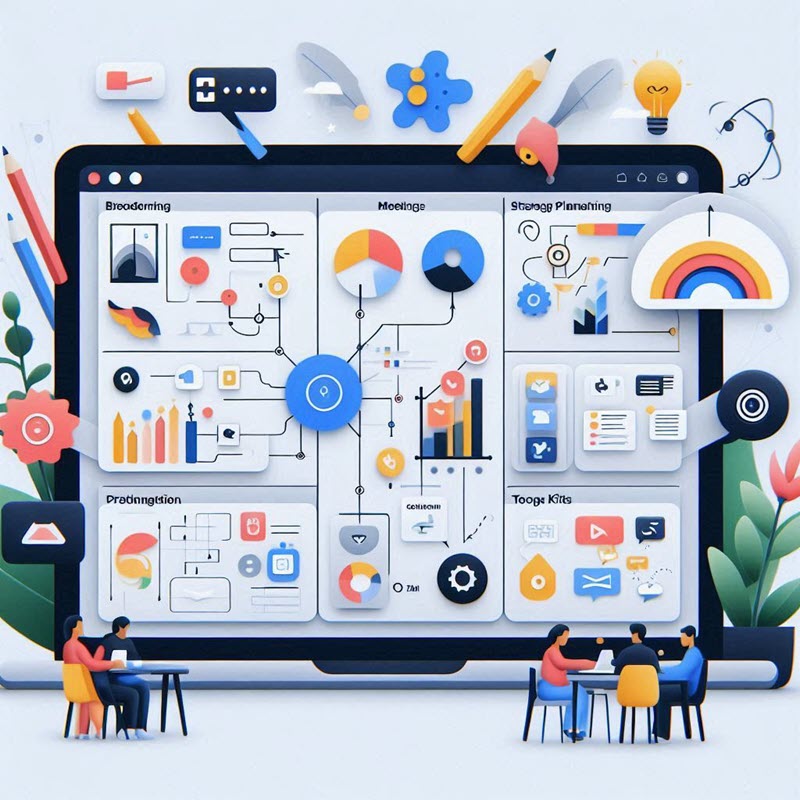
Creately is a web-based visual collaboration and diagramming platform that caters to a variety of needs. You can use it for all your everyday work such as brainstorming, to conduct meetings and workshops, strategy and planning, manage projects, visualize research findings and maintain documentation (Wiki). Creately has a user-friendly interface and the simplicity of the app makes it easy for anyone to use it with no learning curve. Let's dive into how Creately performs for specific uses.
Visual Collaboration and Whiteboarding
- Infinite Canvas: Creately workspaces feature an infinite canvas, where you can visualize anything freely, without having to stick to any particular format or frame. Let ideas flow freely and add anything to the canvas.
- Templates and Tool Kits: Creately Tool Kits consist of templates coupled with a sample database for an array of processes you can use to get started quickly. The app also has a community of over 1000 professionally made templates catering to multiple use cases.
- Real-Time Collaboration: Work with colleagues on diagrams simultaneously. Asynchronous editing and in line commenting to share instant feedback.
- Asynchronous Editing: Collaborate with team members on a virtual whiteboard simultaneously. See edits unfold in real-time, fostering a dynamic brainstorming environment.
- Presentation Mode: This eliminates the need for you to switch apps to create separate presentations. You can guide your audience through any diagram or workspace (showing only what you need and hiding the rest per slide).
- Version History: Track changes made to the whiteboard and revert to previous versions if needed. This ensures everyone is on the same page and allows for easy backtracking.
Diagramming
- Rich Shape Library: Creately boasts an impressive collection of more than 20 shape libraries, connectors, and icons for various diagrams like flowcharts, UML diagrams, network diagrams, organizational charts, mind maps, etc.
- Template Library: Leverage pre-built whiteboard templates for common scenarios like project planning or user journey mapping, saving valuable setup time.
- Customization: Shapes can be deeply customized with colors, gradients, and line styles. You can even import your own SVGs for a truly unique touch.
- Super fast drawing: Drag-and-drop functionality makes creating visuals intuitive. It also has keyboard shortcuts so you can draw as fast as you type. The Plus Create function intuitively guesses the next relevant shape and adds it to the canvas with a single click. You can also use preset color themes and shape formatting to customize your diagrams.
Brainstorming
- Mind Mapping: Creately's mind map templates provide a visual framework to capture ideas and explore connections. Organize thoughts by color-coding, adding images, and collapsing branches.
- Sticky Notes: Use virtual sticky notes to jot down ideas, group them thematically, and easily move them around for better organization.
- Voting: Creately facilitates faster team decision making with voting, where you can vote on any item on the canvas publicly or anonymously. Everyone sees the voting action as it happens and this helps foster transparency and unbiased opinions.
Managing Projects
- Visual Task Management: Use Creately to create visual roadmaps, track project timelines with Gantt charts, and assign tasks to team members with Kanbans. This fosters transparency and simplifies project communication.
- Integration Potential: Integrates with project management tools like Jira, Google Workspace and Github, allowing you to import tasks and visualize project progress within Creately.
- Commenting and Feedback: Add comments directly to diagrams, fostering communication and feedback exchange within the project team.
- CSV Data Import and 2-Way Sync with Google Sheets: Creately is powered with advanced database features that allow you to visualize data. For instance, you can import employee information in a CSV file to instantly generate an org chart that accurately captures all information and maintains a visual hierarchy of the reporting structure.
- Creately VIZ: This is Creately’s AI assistant that helps you generate visuals with a single prompt, expand and organize ideas and turn ideas into action items which can be tracked on a Kanban. Creately VIZ helps automate tasks when using the app, saving your time and helping you work efficiently.
- Limited Number of Shapes Per Canvas (Free Version): The free plan restricts the shape count per canvas, making it unsuitable for large-scale, intricate diagrams.
- Advanced Features Locked: Features like data linking and advanced formatting are reserved for paid plans.
- Learning Curve for Project Teams: Team members unfamiliar with Creately might require additional training to effectively utilize its project management capabilities.
Pricing
Creately offers a free plan with limited features, paid plans start at $5 per user per month (billed annually), and increase based on features and team size.
Click for more information on Creately pricing.
Summary
Creately is a powerful tool for visual thinkers and offers a wide range of features for diagramming, brainstorming, and basic project management. Its user-friendly interface, extensive template library, and real-time collaboration features make it a valuable asset for individual users and teams.
 Explore more on these topics
























 Guest Blogging: The Definitive Guide

 Top Trending Topics
 Share This
 Link copied!
 Recently Updated News