




Microsoft Power Automate vs. n8n: What’s the Real Difference?
Last updated: December 23, 2025 Read in fullscreen view


 Recommended for you
- 14 Aug 2024
 From Steel to Software: The Reluctant Evolution of Japan's Tech Corporates 177/722
 - 21 Nov 2025 Top 8 Cloud Transformation Companies in USA in 2026 160/216
- 19 Oct 2021 Software development life cycles 143/821
- 13 Oct 2021 Outsourcing Software Development: MVP, Proof of Concept (POC) and Prototyping. Which is better? 127/603
- 04 Feb 2026 Top Workflow Automation Services Driving Digital Transformation 127/162
- 21 Apr 2026 Vibe Coding vs. Expert Shopify Development: What AI Tools Can (and Can't) Do? 125/150
- 04 Oct 2021 Product Validation: The Key to Developing the Best Product Possible 125/433
- 31 Jul 2025 Top WooCommerce Pre-Order Plugins with Countdown & Discounts 123/219
- 12 May 2026 Top 6 AI AR/VR Filter Tools for Mind-Blowing Videos and Photos in 2026 123/143
- 07 Oct 2025 Case Study: Using the “Messaging House” Framework to Build a Digital Transformation Roadmap 121/200
- 22 Dec 2025 The Role of Automotive Software in Building Smarter Vehicles 116/158
- 12 Oct 2022 14 Common Reasons Software Projects Fail (And How To Avoid Them) 109/674
- 21 Aug 2023 30 Must-Know IT Consulting Buzzwords Explained 107/134
- 12 Aug 2024 Understanding Google Analytics in Mumbai: A Beginner's Guide 106/213
- 16 Dec 2025 Reducing Cognitive Friction in Software Development: A Guide to Faster, Happier Teams 104/177
- 28 Jul 2022 POC, Prototypes, Pilots and MVP: What Are the Differences? 100/841
- 15 Dec 2025 What Does ERP-Friendly Mean? A Practical Guide for Modern Enterprises 97/140
- 12 Dec 2021 Zero Sum Games Agile vs. Waterfall Project Management Methods 95/509
- 31 Aug 2022 What are the best practices for software contract negotiations? 95/366
- 05 Sep 2023 The Cold Start Problem: How to Start and Scale Network Effects 91/288
- 05 Aug 2024 Revisiting the Mistake That Halted Japan's Software Surge 88/435
- 05 Mar 2021 How do you minimize risks when you outsource software development? 86/419
- 06 Jan 2026 Risk & Change Management Through the 3P Model 86/131
- 06 Mar 2024 [SemRush] What Are LSI Keywords & Why They Don‘t Matter 80/282
- 01 Dec 2023 Laws of Project Management 78/393
- 18 Jul 2021 How To Ramp Up An Offshore Software Development Team Quickly 73/665
- 04 Oct 2022 Which ERP implementation strategy is right for your business? 70/430
- 01 May 2024 Warren Buffett’s Golden Rule for Digital Transformation: Avoiding Tech Overload 69/277
- 15 Aug 2025 Quantum Technology: Global Challenges and Opportunities for Innovators 60/190
- 28 Oct 2022 Build Operate Transfer (B.O.T) Model in Software Outsourcing 57/467
- 29 May 2026 The Role of IoT in Modern Insurance App Development 53/63
- 25 Jun 2026 Vercel: The "Secret Weapon" for Modern, High-Performance Web Deployment 45/50
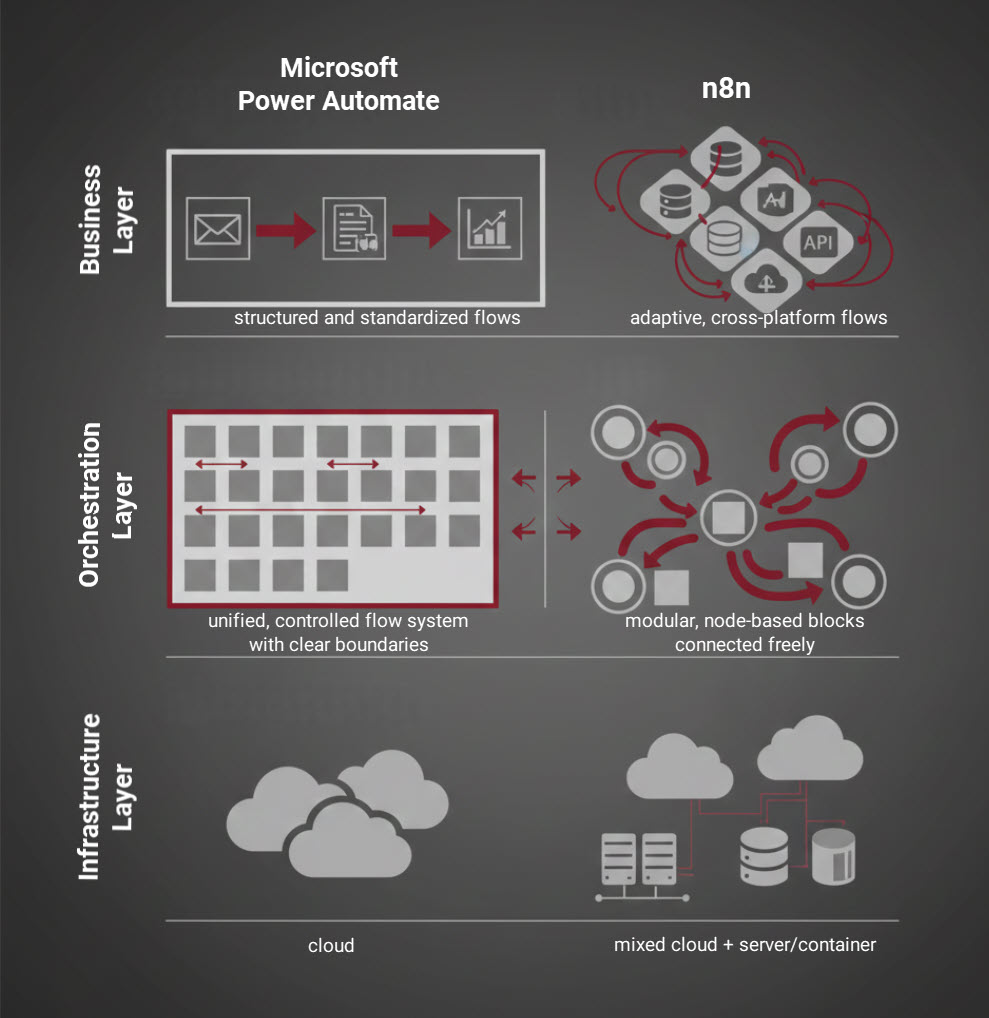
Automation has become a core pillar of modern digital operations. When businesses look to automate workflows, two tools frequently surface in discussions: Microsoft Power Automate and n8n. At first glance, they appear similar-both promise to save time, reduce costs, and streamline processes. However, beneath the surface, they are built on very different philosophies and serve very different needs.
This article breaks down the real differences between Power Automate and n8n, helping you decide which tool is the right fit for your organization.
Understanding the Core Philosophy
Microsoft Power Automate
Power Automate can best be described as a Swiss Army knife for the Microsoft ecosystem. It is deeply embedded within Microsoft 365 and designed to work seamlessly with tools such as Outlook, Teams, SharePoint, Excel, Dynamics, and Power BI.
Its primary mission is accessibility. Built on a low-code / no-code approach, Power Automate enables business users-not developers-to automate everyday tasks quickly and safely within an enterprise environment.
If your organization already “lives and breathes” Microsoft 365, Power Automate feels like a natural extension rather than a new tool.
n8n
n8n, by contrast, is a powerful open-source automation engine built for flexibility. Its philosophy is not tied to any single ecosystem. Instead, it is designed to connect almost anything to everything.
You can self-host n8n on your own infrastructure for free, customize it deeply, and build complex multi-step workflows that span multiple platforms-Microsoft, Google, Slack, HubSpot, Salesforce, custom APIs, and more.
While n8n also offers a hosted, paid version, its real strength lies in giving technically capable teams full control over automation logic, data flow, and infrastructure.
The Three Factors That Matter Most
1. Ease of Use
Power Automate is optimized for speed and simplicity. It offers thousands of pre-built templates for common business tasks, allowing users to create workflows with just a few clicks. The interface is intuitive, polished, and beginner-friendly.
n8n also uses a visual, node-based interface, but it becomes complex much faster. Setting up credentials, API keys, and custom logic requires technical knowledge. The learning curve is steeper-but that complexity unlocks significantly more power.
Summary
- Power Automate: Easy, fast, business-user friendly
- n8n: Powerful, flexible, developer-oriented
2. Integrations & Connectivity
This is where the core difference becomes most visible.
Power Automate boasts over a thousand connectors, with deep, enterprise-grade integration across Microsoft services. However, it is largely optimized for the Microsoft universe.
n8n, driven by its open-source community, also supports thousands of integrations-and allows you to build your own connectors for any custom API. If your workflows span multiple vendors and platforms, n8n has a clear advantage.
Summary
- Power Automate: Best for Microsoft-first environments
- n8n: Best for heterogeneous, multi-platform stacks
3. Cost
Power Automate is subscription-based, but it is often included in Microsoft 365 plans. Many organizations are already paying for it without realizing they have access to automation capabilities.
n8n offers two paths:
- Self-hosted: Free, unlimited workflows, extremely cost-effective if you manage your own infrastructure.
- Hosted: Paid plans based on usage and resources, suitable for teams that want convenience without server management.
Summary
- Power Automate: Predictable, bundled cost
- n8n: Flexible, potentially far cheaper at scale
Real-World Scenarios
Scenario 1: Microsoft-Centric Small Business
You use Microsoft Teams for communication and SharePoint for document management. You need a simple expense approval workflow.
Best choice: Power Automate
You already own it, integration is seamless, and setup takes minutes-no technical staff required.
Scenario 2: Multi-Platform Startup
Your stack includes HubSpot for leads, Salesforce for CRM, and Slack for internal communication. You need to sync data across all three and notify teams automatically.
Best choice: n8n
It was built for this kind of cross-platform automation and offers the flexibility required to connect diverse tools smoothly.
Closing Thoughts
Both Power Automate and n8n are excellent automation platforms-but they serve different masters.
- Power Automate is the undisputed champion for organizations deeply invested in the Microsoft ecosystem and seeking a user-friendly, enterprise-grade solution.
- n8n is ideal for teams that need maximum control, flexibility, and platform independence-and are comfortable handling the technical side.
The most practical advice? Start with the tools you already own. If you’re a Microsoft 365 user, explore Power Automate first. You may be surprised how much time and effort it can save.
Automation doesn’t begin with tools-it begins with intent. Choose the one that aligns with your ecosystem, skills, and long-term strategy.
 Explore more on these topics
























 Guest Blogging: The Definitive Guide

 Top Trending Topics
 Share This
 Link copied!
 Recently Updated News